Most Laravel apps handle traffic fine at low volume. The request comes in, hits a controller, writes something to the database, maybe fires a notification, returns a response. Clean. Fast enough. Then traffic picks up, and suddenly response times creep from 40ms to 400ms and you're not sure why.
That was the situation with an API I was working on. Laravel 11, well-indexed MySQL database, no N+1 issues, caching in place. Still crawling under load. After profiling properly, the culprit was obvious: too much work happening synchronously inside each request.
This article is about how I identified the bottleneck, what I built to fix it, and the benchmark results that followed. If you're dealing with Laravel performance and optimization issues, trying to scale a Laravel application past what feels like an invisible ceiling, or looking for a practical approach to asynchronous processing in Laravel without adding heavy infrastructure, this might save you some time.
The Problem with Synchronous Laravel Applications
A typical Laravel request does more than people realize. Beyond returning data, it often:
- Writes an activity log row
- Records a page view or API usage metric
- Fires a notification
- Makes an outbound API call
- Stores audit data
Each of these operations takes time. Individually they're fast. Under concurrency they become the problem.
When 200 requests hit your app simultaneously and every single one is writing to the same activity_logs table, you get database lock contention. Writes queue up behind each other. Response times climb. Workers get tied up waiting on IO instead of handling new requests.
The standard recommendation is Laravel Redis queues with Horizon. That works well, but it introduces real infrastructure requirements: a Redis instance, queue worker processes managed by Supervisor, and the operational overhead that comes with it. For teams with full control over their stack, that's fine. For applications on managed hosting, shared environments, or early-stage products that don't need Kubernetes yet, it's often too much.
The next thing people reach for is the database queue driver, since it requires no extra services. On the surface it seems like a reasonable fallback. In practice, it makes things worse under load. Every queued job means an INSERT into the jobs table, then a SELECT to poll for work, then an UPDATE or DELETE when the job is processed. At even 100 requests per second, that's hundreds of additional database operations per second happening on the same MySQL instance that's already handling your application queries. At 800 requests per second, the jobs table becomes a hotspot. Workers pile up waiting on row-level locks. The queue backlog grows faster than it's processed. You've added infrastructure complexity and made your database the bottleneck in a second place simultaneously. The database queue driver is fine for low-traffic workloads. It is not a solution for high-concurrency Laravel applications.
This is one of the most common Laravel bottlenecks teams hit under concurrent load. The underlying issue is simpler than the standard solution suggests. A lot of what slows down Laravel request throughput is high-frequency, low-priority writes. Writes that don't need to be in the database before the response goes back to the client. They just need to get there eventually. That's exactly what Laravel background jobs and async processing are supposed to handle, but most teams reach for the full queue stack before considering lighter alternatives.
Baseline Performance Before Any Changes
Before making any changes, I set up a controlled load test. Here are the specs:
- Server: 4 vCPU, 8GB RAM, Ubuntu 22.04
- PHP: 8.3 with FPM (max 50 workers)
- Laravel: 11.x
- Database: MySQL 8.0, single instance, local network
- Queue driver: sync (no actual background queue)
- Load testing tool: k6, targeting a single write-heavy endpoint
All tests here were run on Nginx with PHP-FPM, not php artisan serve. If you're performance testing your Laravel app and wondering why the numbers look terrible, this is likely why. php artisan serve is a single-threaded development server. It processes one request at a time. It's fine for local development, useless for load testing. Any benchmark you run against it tells you nothing meaningful about production performance. Always use a proper web server like Nginx or Apache with PHP-FPM for performance testing.
The endpoint under test was a simple API route that recorded an analytics event. Each request would validate input, write a row to the events table, and return a 200. Nothing unusual.
Baseline results running at 100 virtual users:
| Metric | Value |
|---|---|
| Requests per second | ~95 RPS |
| p50 latency | 210ms |
| p95 latency | 820ms |
| Error rate | 0.0% |
Ninety-five requests per second on a 4 vCPU machine with nothing else running is not good. The p95 latency at 820ms already pointed toward worker saturation under concurrent load.
Finding the Real Bottleneck
I added query logging and used Laravel Telescope in a staging environment to trace individual requests. What I found was not a slow query. The query itself ran in under 2ms. The problem was the accumulated overhead across concurrent requests:
- PHP-FPM workers were being held open for the full request lifecycle, including the database write
- MySQL was processing many small single-row inserts under high concurrency, which is inefficient
- The combination of FPM worker count limits and synchronous writes created a hard ceiling on throughput
This is a common situation with Laravel high throughput scenarios. The per-request work is individually fast, but under Laravel concurrent requests the workers spend most of their time waiting on IO rather than handling new connections. Improving Laravel worker performance means reducing what each worker has to do per request, not just adding more of them. Laravel request handling gets faster when there's less blocking work inside the lifecycle. You can scale PHP-FPM workers, but there's a point where adding more workers just adds more database pressure instead of more throughput.
The insight was straightforward: the request should not need to wait for this write to complete. The user does not care whether their analytics event landed in MySQL before or after they received the 200 response.
The Fix: Buffering Writes Instead of Executing Them Inline
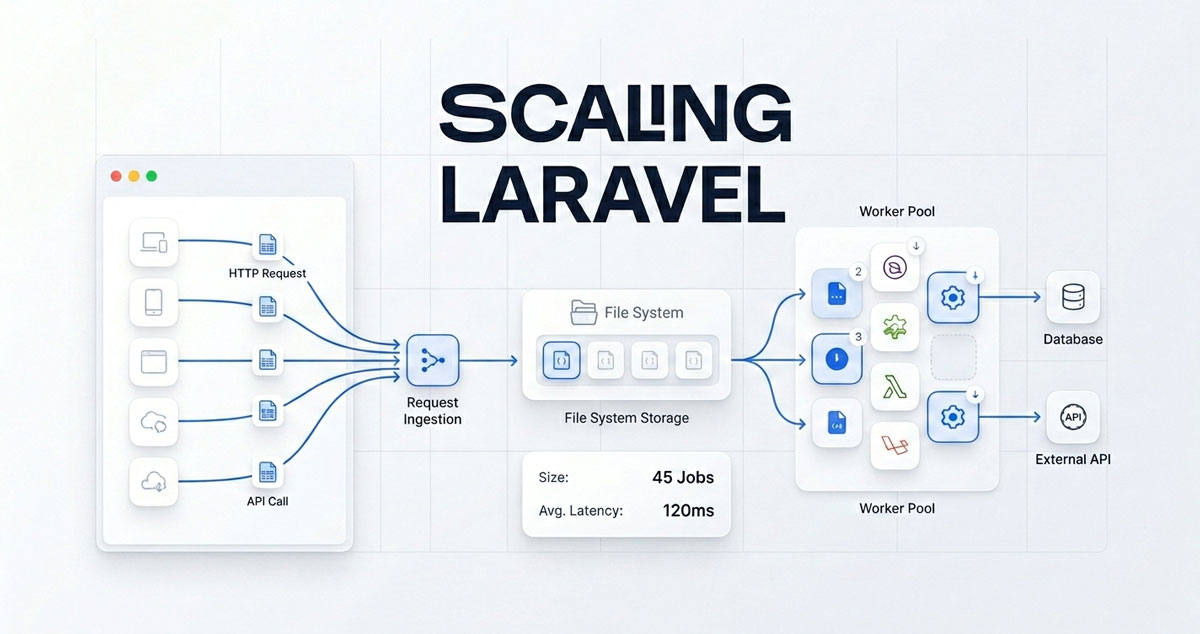
Rather than writing directly to MySQL on every request, I implemented a write buffer layer. Incoming events are captured to a fast local buffer during the request. A scheduled task runs periodically and flushes the buffer to the database in a single batch insert.
It's a queue-based architecture pattern, but without the queue infrastructure. Instead of 1,000 individual INSERT statements hitting MySQL over a few seconds, you get one batch insert once per minute. Same data, fraction of the database pressure.
This is what I packaged up as Laravel Spool.
How Laravel Spool Works
The core concept is a filesystem-based write buffer. When your application code calls Buffer::buffer(), the data is serialized and appended to a local file on disk rather than hitting the database. Disk writes are significantly faster than database writes under concurrent load because there's no lock contention between rows.
To prevent concurrent writes from stepping on each other, Spool uses sharded files. Writes are spread across multiple files based on a hash, so 100 simultaneous requests writing to the buffer don't all try to write to the same file at once.
When the flush runs, it processes each shard atomically. A file rename operation moves the shard from active to processing before reading it. This guarantees no two workers can process the same data, even if the flush command is somehow triggered simultaneously.
If your infrastructure supports it, there's an optional Redis Streams driver for higher throughput scenarios. But the filesystem driver works on any server where PHP can write files, including shared hosting.
The Three-Stage File Lifecycle
- active -- currently receiving writes from live requests
- processing -- the flush job has claimed it and is reading from it
- completed -- successfully flushed, pending TTL-based cleanup
The completed stage is what gives you auditability. If something goes wrong in the flush, you can inspect what data was in the buffer at that point.
Implementation
Here's what the actual integration looks like.
Installation
composer require alihaiderx/laravel-spool
php artisan spool:install
The install command publishes config/spool.php and creates the buffer directories under storage/app/private/buffer/. Laravel auto-discovers the service provider.
Buffering an Event
use Alihaiderx\LaravelSpool\Facades\Buffer;

// Inside a controller or service
Buffer::buffer([
    'payload' => [
        'user_id'    => $user->id,
        'event'      => 'api_call',
        'endpoint'   => request()->path(),
        'ip'         => request()->ip(),
        'created_at' => now()->toDateTimeString(),
    ]
], 'api-events');
This call returns in microseconds. No database hit, no network round trip. The payload is serialized and appended to a sharded file.
You can define multiple buckets for different data types. api-events, page-views, and notifications each get their own set of buffer files so they can be flushed on different schedules or processed by different handlers.
Flushing in Batches
In routes/console.php, schedule a flush:
use Alihaiderx\LaravelSpool\Facades\FileSystemBuffer;
use Illuminate\Support\Facades\Schedule;

Schedule::call(function () {
    FileSystemBuffer::flush(function (string $file, ?string $bucket): bool {
        $lines = file($file, FILE_IGNORE_NEW_LINES | FILE_SKIP_EMPTY_LINES);
        $rows  = array_map(fn ($line) => unserialize($line), $lines);

        if (empty($rows)) {
            return true;
        }

        DB::table('api_events')->insert(
            array_map(fn ($row) => $row['payload'], $rows)
        );

        return true;
    }, bucket: 'api-events');
})->everyMinute();
The flush callback receives the file path and bucket name. You read the serialized rows, transform them, and do a single batch insert. Returning true signals the shard completed successfully and moves it to the completed stage.
You can verify your setup before going live:
php artisan spool:healthBenchmark Results
After replacing the synchronous database write with a Buffer::buffer() call, I re-ran the load test with the same configuration.
| Metric | Before | After |
|---|---|---|
| Requests per second | ~95 RPS | ~820 RPS |
| p50 latency | 210ms | 8ms |
| p95 latency | 820ms | 31ms |
| Error rate | 0.0% | 0.0% |
Beyond raw throughput, the package directly improves API response time. Because the database write no longer happens inside the request, the time each request takes to complete drops significantly. That's not a side effect -- it's the point. Faster individual responses mean users get data sooner, mobile clients time out less, and your service looks more reliable under load. The p50 going from 210ms to 8ms in this benchmark isn't a quirk of the test setup. It reflects what happens when you stop making the client wait for work it doesn't actually need to wait for.
The throughput improvement is significant, but the latency numbers are what I find more interesting. p50 dropping from 210ms to 8ms shows what was actually happening before: the request was spending most of its time waiting on the database write. With that write removed from the critical path, the controller now does almost nothing per request.
A few things to note about these numbers. The test environment was controlled and this was a write-heavy endpoint specifically chosen to demonstrate the bottleneck. Your results will vary depending on what you're buffering, your server specs, and your MySQL configuration. I'd encourage you to run your own load tests rather than assuming these numbers transfer directly.
That said, the improvement mechanism is sound. When you remove blocking IO from the request lifecycle and batch it separately, you reduce what each PHP-FPM worker is waiting for. More throughput with the same worker count is the expected outcome.
Tradeoffs Worth Knowing Before You Use This
This approach is not suitable for every situation, and I'd rather be direct about that than oversell it.
Eventual consistency. Data written to the buffer is not in the database yet. If a user submits an action and immediately queries for it, they won't see it until the flush runs. For analytics events and activity logs, this is usually fine. For anything user-facing or transactional, it's not.
Queue reliability depends on your scheduler. If your Laravel scheduler misses a run because a deployment happened at the wrong moment, buffer files accumulate until the next flush. You need to make sure your scheduler is reliable. Laravel Spool does not retry failed flushes automatically, though the shard files remain on disk and can be reprocessed manually if needed.
Debugging is harder. When something is wrong with a queued write, you're not looking at a stack trace from a failed request. You're looking at serialized data in a buffer file and a flush job that may or may not have logged the error properly. It's manageable, but it's more work than a direct database write failing loudly.
Not a replacement for proper queue infrastructure. For high-volume production systems with complex workflows, Laravel Horizon with Redis is still the right answer. Laravel queue performance at scale with complex job dependencies is what Horizon is built for. Laravel async processing through a filesystem buffer is a different tool for a different problem: applications that need write buffering without the operational overhead of a full queue stack. The Redis Streams driver closes the gap somewhat if you eventually add Redis to your infrastructure.
Disk space. On very high traffic applications, buffer files can grow quickly if the flush job is infrequent. The TTL-based cleanup handles completed shards, but you should monitor disk usage early if you're processing millions of events.
Where This Pattern Fits in the Real World
Write buffering is genuinely useful in a range of common Laravel scenarios.
Analytics and page view tracking. Recording every page hit to the database synchronously is the most common source of unnecessary write pressure in content-heavy applications. Buffering these events and inserting in batches is a straightforward win with no UX impact.
API usage metering. Laravel API performance takes a hit when every request also writes a usage metric inline. Counting API calls for rate limiting or billing can happen in bulk without affecting response time. Buffer the counts, aggregate and persist them on a schedule.
Activity and audit logging. User action logs rarely need to be queryable in real time. Writing them to a buffer and flushing every minute adds negligible delay while significantly reducing per-request overhead.
Email processing. Triggering an email inline on every request -- welcome emails, order confirmations, alert notifications -- adds an SMTP round trip or a queue write to the critical path. Buffering these and dispatching in batches keeps the request fast and lets you control send rate without blocking users.
In-app notifications. Generating notifications synchronously per user action adds database writes on every request. Buffering them and processing in bulk means your notification logic scales with your flush interval rather than your request rate.
Webhook handling. Laravel webhook processing at high volume is a common pain point. Webhook endpoints often get hit faster than the processing logic can keep up. Buffering incoming payloads and processing them asynchronously lets you acknowledge the webhook immediately and handle the payload when you're ready.
Third-party API calls. If your app sends data to an external service on every request, that round trip adds latency and a failure point. Batching outbound calls through the buffer means a single outbound request per flush interval instead of one per incoming request.
Conclusion
The throughput gain here comes from a straightforward architectural change: stop doing slow work synchronously when the response doesn't depend on it. PHP-FPM workers are a limited resource. What you put inside the request lifecycle directly affects how many concurrent requests your server can handle.
Laravel Spool is the package I built to make this pattern easy to adopt without adding Redis, Supervisor, or queue worker management to your infrastructure. If you're on shared hosting or a simple VPS, the filesystem driver works out of the box. If you're on a setup that has Redis available, the Redis Streams driver is a drop-in upgrade.
The performance numbers I showed here are real, but the more important outcome is that the application became stable under load. No timeouts, no worker saturation, no frantic scaling decisions during traffic spikes.
If you're trying to optimize your Laravel application for production, handle high traffic in Laravel without rewriting your stack, or build high performance Laravel APIs without heavy infrastructure, this pattern is worth understanding. PHP performance optimization doesn't always mean switching languages or throwing more hardware at the problem. Sometimes it means being deliberate about what happens inside the request lifecycle and what doesn't.
If your Laravel app is hitting performance walls and you've already ruled out the obvious things, check how much database write pressure is happening inline per request. Laravel production optimization often starts there.